
Sunrun
Sunrun, IncHouse & Home
3.5696.00 Reviews
- Version
- 3.3.0
- Installs
- 100.00K
- Age Rating
- Everyone
Screenshots
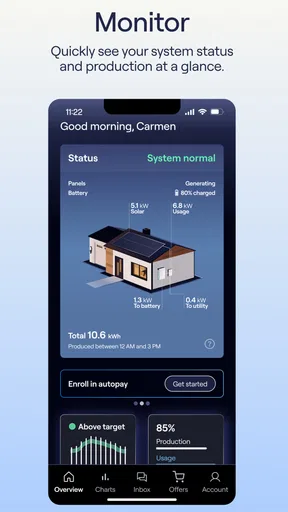
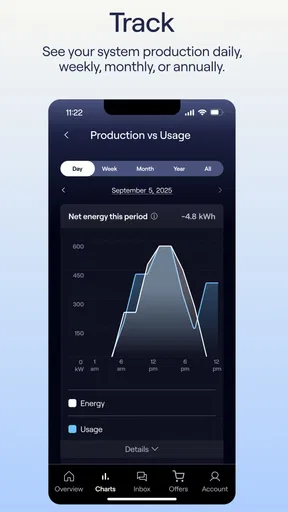
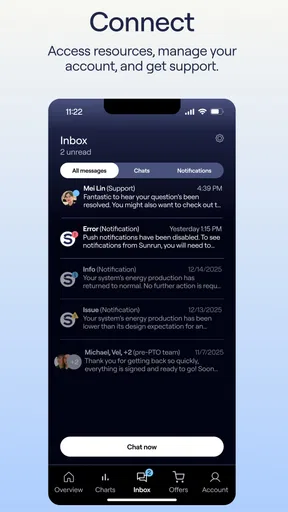
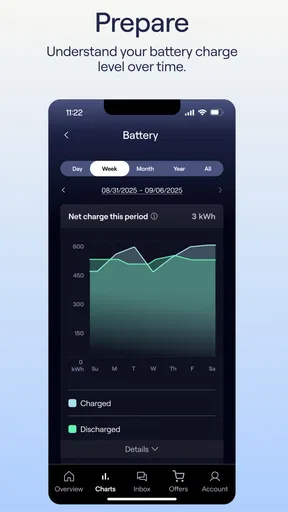
Our Review of Sunrun
 Analysis by Appyee
Managing a home solar system is not always about watching energy production. In everyday life, the practical questions are often simpler: Is the system working, has a payment gone through, and where do I turn when something feels wrong? Sunrun, developed by Sunrun, Inc, is built around those customer tasks rather than trying to be a general smart-home dashboard. I found it most useful as a single place for Sunrun customers to check their system, handle billing, and look for support when a question comes up.
That focus makes the app easy to understand, but it also defines its limits. This is not an independent solar-monitoring tool for every brand of equipment, and it is not a replacement for a full household budgeting app or a technical service visit. Its value depends on being a Sunrun customer and wanting a convenient connection between the solar installation, the account, and the company behind it.
From a solar question to a practical answer
I’d start with the question that makes a solar app useful in the first place: what can I check quickly, and what should I do if the answer raises a concern? Sunrun is most helpful when I treat it as a practical first stop, not a promise of instant diagnosis. That distinction leads naturally to how I’d judge its pace and day-to-day responsiveness.
Starting with the right customer need
The best way to approach Sunrun is to begin with a specific situation. Imagine checking the home after a cloudy day and wondering whether the solar system is behaving normally. Instead of searching through old messages or trying to remember a support number, I would open the app and start with the system information available there. On another day, the starting point might be a bill that needs attention, or a question that requires contact with Sunrun.
This makes the app a useful companion for the period after installation, when the novelty of solar ownership has passed and small administrative jobs become more important. A customer may not need to study energy data every day, but may appreciate having account-related tasks and support in the same mobile space. The app is free, carries an Everyone content rating, and is aimed at Sunrun customers rather than at people comparing solar providers.
One practical tip is to decide what you want to accomplish before opening it. If the goal is to investigate system behavior, start with monitoring. If the goal is to keep the account current, go directly to billing. If the issue is unclear, support is the more sensible route. Treating those as separate paths prevents the common mistake of repeatedly checking production information when the actual problem is an account or service question.
Checking the system without turning it into a hobby
System monitoring is the most obvious reason to use the app, but I think its real benefit is context. A quick check can help a homeowner decide whether a concern deserves attention or whether it is probably connected to ordinary conditions such as weather and household usage. The useful habit is not to react to every change. It is to look for a pattern and then decide whether the pattern needs a support conversation.
For example, if I notice less activity than expected, I would first consider the day’s conditions and whether my expectations are realistic. I would then check again later rather than immediately assuming the equipment has failed. If the concern remains, having already looked at the system view gives me a clearer starting point when contacting Sunrun. That is a small but important workflow improvement: the monitoring screen becomes preparation for support, not just a place to glance at numbers.
There is also a trade-off here. A dedicated solar customer app can make information easier to reach, but it may not satisfy someone who wants deep technical analysis, extensive historical comparisons, or controls for unrelated smart-home equipment. I would choose a broader energy platform for detailed cross-device analysis, while choosing Sunrun when the priority is keeping the Sunrun relationship and its basic system information together.
Moving from monitoring to billing
The handoff from system information to account management is where the app becomes more than a status viewer. When a customer needs to pay a bill, moving into the billing area avoids switching between a solar dashboard and a separate account website. I like this kind of arrangement because it connects the physical service at the home with the financial responsibility attached to it.
A realistic example would be receiving a reminder while away from a computer. I would open the app, review the account area, complete the payment task, and then leave with the issue handled rather than postponing it. The important point is not that mobile payment is unusual; it is that the same customer-facing tool used for system questions can also be used for an account task. That reduces the number of places I need to remember.
Still, I would not use the app as my only record-keeping system. For household finances, I prefer keeping confirmations and budgeting notes in the same place as other recurring expenses. Sunrun can help complete the payment step, but it should sit inside a wider routine that includes checking the bank account and retaining whatever confirmation the customer normally keeps. The app simplifies the action; it does not replace personal financial organization.
Preparing a support request before handing it over
Support is the third part of the workflow, and it is where accurate preparation matters most. Before contacting Sunrun, I would note what I observed, when I noticed it, and whether the issue appeared connected to a particular change at home. I would also check whether the concern is about system behavior, billing, or the account itself. That short preparation can make the handoff less frustrating because the support conversation begins with a defined problem.
This is one of the less obvious strengths of having monitoring and support in the same app. The customer does not have to describe a vague concern such as “the solar is not right” if the app has already helped narrow the question. Even when the app cannot resolve the issue itself, it can act as the first step in a more useful service request.
At the same time, I would not expect an app to diagnose every installation problem. A mobile interface can show customer-facing information and provide a support route, but physical equipment, wiring, roof conditions, or service work may still require professional attention. The sensible approach is to use the app to document and communicate the issue, not to treat it as permission to investigate electrical hardware personally.
How the handoffs feel in normal use
The complete flow has three handoffs. First, I move from the home’s solar system to the information shown on the phone. Second, I move from that information to an account action such as paying a bill. Third, I move from self-service to Sunrun support when the problem needs another person. The app is strongest when those transitions remain clear and the customer knows which path to take next.
Good handoffs reduce repetition. If I have already checked the system, I can approach support with a more specific observation. If I have completed a payment, I can stop treating the account as an unresolved issue. If I am only checking production, I do not need to enter the billing path at all. This sounds basic, but separating these jobs is what keeps a utility-related app from becoming confusing.
My advice is to use the app as a short workflow rather than as something to browse aimlessly. Open it with a question, follow the relevant path, and record the outcome when the task is important. That habit is especially helpful for homeowners who share responsibility for the household account, because it makes it easier to explain what was checked and what still needs action.
What the result looks like
The result is not necessarily a dramatic insight into household energy. More often, it is a completed small task: I have checked the system, paid what was due, or created a clearer support request. Those outcomes are modest, but they are exactly the kind of outcomes that make a customer app worthwhile. The app saves effort by keeping common Sunrun interactions close at hand.
Its audience is also fairly clear. I would recommend it to an active Sunrun customer who wants mobile access to system information, billing, and support without maintaining separate routines for each. It is particularly suitable for someone who prefers checking an account from a phone and wants a straightforward first stop when a question appears.
I would be more cautious about recommending it to a person who is only researching solar, a homeowner with equipment from another provider, or an enthusiast looking for laboratory-level analysis. Those users need comparison tools, manufacturer-neutral monitoring, or more advanced energy-management features. Sunrun is better understood as a customer-service and account companion for its own solar relationship.
Where the flow breaks down
The main weakness is dependency. The app’s usefulness is tied to the Sunrun customer experience, so it is not a universal control center for a home. That can feel restrictive if a household wants one application to combine solar information with every other energy device. In that situation, a broader platform may be more convenient, even if it does not handle Sunrun-specific billing or support as directly.
Another point of friction is expectation. Seeing system information on a phone can create the impression that every problem should be solvable there. In practice, monitoring, payment, and support are different jobs. The app can help with the first two and start the third, but a support issue may still require patience and a handoff to Sunrun. I consider that a limitation of the workflow rather than a reason to dismiss the app, provided users understand its role.
Account tasks also deserve care. A convenient payment screen is useful, but convenience can encourage rushed decisions. I would review the account details before completing a payment and keep normal financial records afterward. For shared households, I would also make sure everyone knows who is responsible for the account, because a simple app cannot remove confusion about ownership or payment responsibility.
Performance expectations should be realistic as well. The current version is 3.2.0, and the app supports devices running Android 7.0 or later. That makes it accessible to many Android users, but compatibility alone does not guarantee that every phone will feel equally fast or that every customer’s account situation will look identical. I would keep the app updated through the normal store process and judge it by whether it completes the customer tasks I actually need.
How it compares with the usual alternatives
The usual alternatives fall into three groups: a web account, a manufacturer’s monitoring tool, or a general energy-management app. A web account can be perfectly adequate for occasional billing, especially for someone who rarely checks the solar system. A manufacturer-focused tool may offer more technical detail for equipment enthusiasts. A general energy app may be better for combining several brands and household measurements.
Sunrun’s advantage is the connection between those customer-facing needs. I can approach a system question, an account task, or a support concern from one Sunrun-centered starting point. Its disadvantage is the same focus: it does not aim to become a neutral dashboard for every home-energy product. I would choose it for convenience within the Sunrun relationship, not for maximum flexibility across brands.
That distinction helps avoid disappointment. If my priority were comparing multiple providers before signing a contract, I would use a comparison resource instead. If my priority were analyzing a whole home with equipment from different manufacturers, I would look for a broader platform. If my priority were simply managing an existing Sunrun account from a phone, this app would be the more direct choice.
My final view after following the full workflow
Sunrun is a focused House & Home app from Sunrun, Inc that connects three practical moments: checking a solar system, paying bills, and getting support. It is free, has an average rating of 3.6 from around 1.4 thousand ratings, and has passed 100 thousand installs, which suggests a meaningful customer audience while also showing that user satisfaction is not universally perfect. I would read that rating as a reason to keep expectations practical rather than as an automatic warning.
The app works best when I use it as a bridge from a home question to a clear next step. Check the system, separate normal variation from a persistent concern, handle billing carefully, and prepare useful details before asking for help. Those habits make the experience more effective than simply opening the app and hoping it will explain everything.
Released on May 16, 2023, with an Everyone age rating, it is approachable for ordinary household use. My recommendation is straightforward: if you are a Sunrun customer and want one mobile place for these core interactions, Sunrun is a sensible everyday companion. If you need provider-neutral monitoring, advanced analysis, or a complete smart-home control center, I would choose a different tool and keep this one for the Sunrun-specific account and support workflow.
Privacy and Permissions
See what permissions an app requests and how it handles your data.
- Calendar
- read calendar events plus confidential information, add or modify calendar events and send email to guests without owners' knowledge
- Contacts
- read your contacts, modify your contacts
- Location
- precise location (GPS and network-based)
- Phone
- read phone status and identity
- Photos/Media/Files
- read the contents of your USB storage, modify or delete the contents of your USB storage
- Storage
- read the contents of your USB storage, modify or delete the contents of your USB storage
- Camera
- take pictures and videos
- Microphone
- record audio
- Wi-Fi connection information
- view Wi-Fi connections
- Device ID & call information
- read phone status and identity
- Other
- view network connections, full network access, change your audio settings, run at startup, draw over other apps, control vibration, prevent device from sleeping, read Google service configuration
Verdict
Strengths of Sunrun
- Free to download and easy to install on compatible devices.
- Provides a convenient way to monitor solar energy production.
- Helps users track household energy usage and system performance.
- Can display battery status and available stored energy at a glance.
- Useful alerts can keep homeowners informed about system activity.
Limitations of Sunrun
- Requires an active Sunrun solar system or customer account to use fully.
- Some features may vary depending on the installed equipment and service plan.
- Energy data may take time to update or occasionally appear delayed.
- Limited usefulness for people who are not Sunrun customers.
- Certain account or support tasks may redirect users to other channels.
Similar Picks in This Category
View All
Universal TV Remote Control
CodeMatics Media Solutions3.9

AlfredCamera Home Security app
Alfred Systems Inc.4.7

Planner 5D: AI Home Design
Planner 5D4.5

Universal Tv Remote-Cast to TV
One Music Player4.1

Zillow: Homes for Sale & Rent
Zillow Group4.8

99acres Buy/Rent/Sell Property
infoedge.com4.3
Frequently Asked Questions
What is Sunrun, and what can I use the app for?
Sunrun is a companion app for customers using Sunrun solar energy services. After signing in, you can generally monitor your solar system’s performance, review energy production, check battery information when applicable, view account details, and access support resources. The exact features available may depend on your Sunrun plan, equipment, location, and whether your installation has been fully activated.
Do I need to be a Sunrun customer to use the app?
Yes, the app is primarily intended for people who have an active Sunrun solar or battery service account. You will normally need your Sunrun login credentials to access system data and account tools. If you are considering Sunrun but have not signed a contract or completed an installation, the app may offer limited information or may not provide access to monitoring features.
Can Sunrun show my home’s energy production and consumption in real time?
The app can provide useful information about solar production and, for eligible systems, battery status and household energy usage. However, the data may not always be perfectly real time. Readings can be delayed because of internet connectivity, equipment communication, maintenance, or reporting intervals. If values appear outdated, checking your connection and waiting for the system to synchronize is recommended.
Can I monitor or control a Sunrun battery through the app?
If your Sunrun installation includes a compatible home battery, the app may let you view its charge level, energy flow, backup status, and other operating information. Some systems may also provide limited controls or settings related to backup and energy use. Available options vary by battery model, installation configuration, utility requirements, and Sunrun’s current software support.
Is the Sunrun app free, and what should I do if it does not work?
The Sunrun app is generally free to download for eligible customers, although using its features requires an active Sunrun account and an installed, connected system. If the app crashes, fails to update, or will not accept your login, try updating it, checking your internet connection, restarting the device, and confirming your credentials. Persistent equipment or account issues should be reported to Sunrun support.
